


Instructions for sharing NFT on Facebook and Instagram platforms
Recently, the Meta giant permitted consumers to integrate NFT into its Facebook and Instagram accounts. At the similar time, artists can also showcase their NFT...
Recently, the Meta giant permitted consumers to integrate NFT into its Facebook and Instagram accounts. At the similar time, artists can also showcase their NFT collections on these two platforms. Today we study with Coinlive how to share NFT on Facebook and Instagram!
Instructions for sharing NFT on Facebook
Step one: Go on Facebook.
Step two: Select the icon “Menu“->”Digital items“.
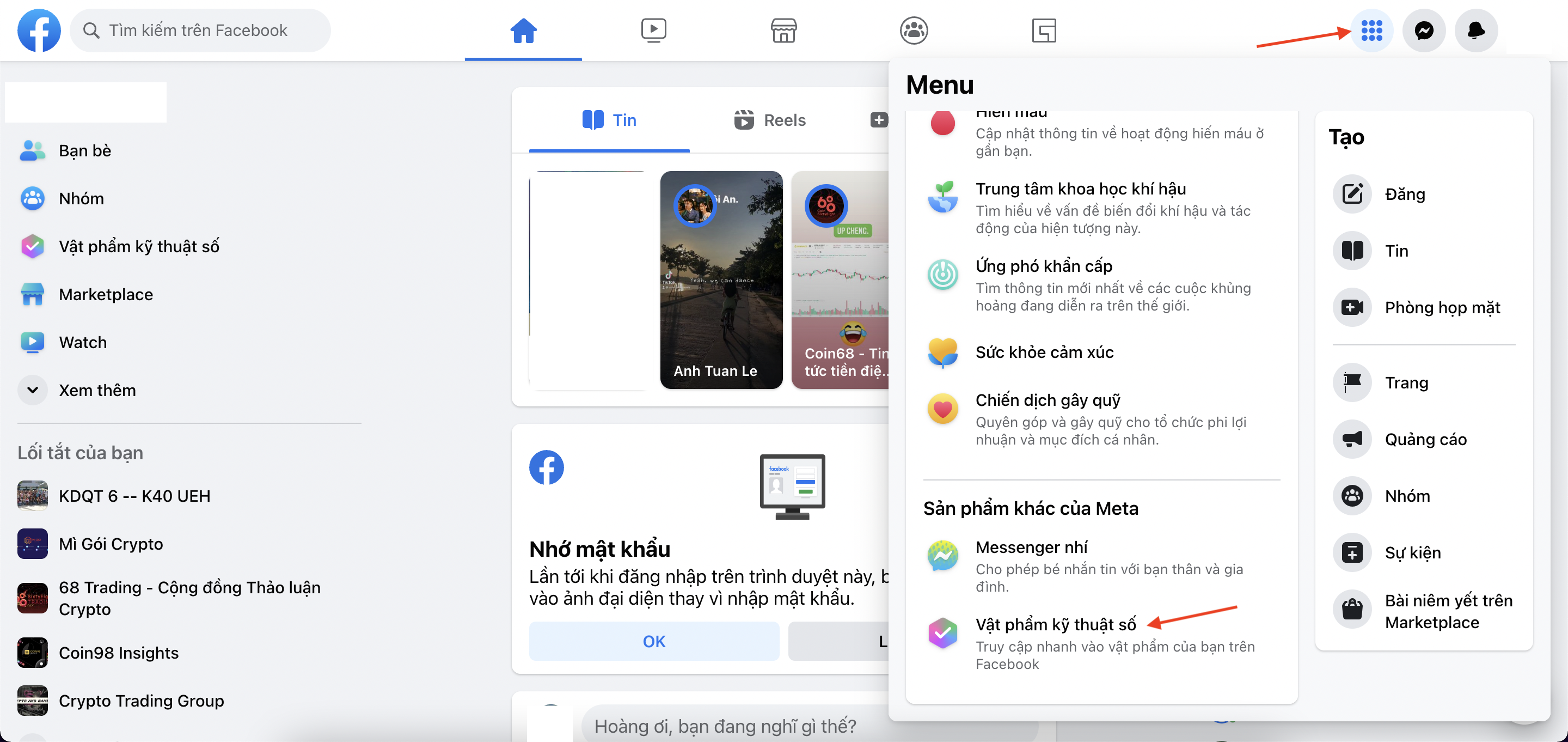
Step three: Choose “More wallets“.

Step four: Choose “Start“.

Step five: Choose “tiếp tục“.

Step six: Connect the wallet. Currently, Facebook only supports the Metamask wallet.

After connecting the wallet, the Facebook interface will display all the NFTs you have in the wallet.

Step seven: Select an NFT you want to share on your profile.
Step eight: Choose “Share in feed“.

Step 9: Choose “To send” to total.

Instructions for sharing NFT on Instagram
Step one: Go to Instagram.
Step two: Select the icons as proven beneath.

Step three: Choose “Digital items“.

Step four: Choose “Connect the wallet“.

Step five: Select the sort of wallet you want to use. Instagram at the moment supports five wallets: Coinbase, Dapper, Metamask, Rainbow, Trust Wallet.

Step six: Similar to Facebook, you just have to have to decide on an NFT in your assortment to share.
summary
Above is a guidebook to sharing NFTs on Facebook and Instagram social networking platforms. Coinlive see you in the following content articles.
You might be interested in:
More From Crypto News

Sports Made Up 98.2% of Polymarket US Turnover in 30 Days: DeFi Rate
Sports contracts accounted for 98. 2% of Polymarket US turnover over a 30-day window, according to DeFi Rate.

Coinbase Denies Breach After Amplitude Incident Exposes Customer Data
Coinbase has denied that its own systems were breached after a security incident at third-party analytics provider Amplitude exposed customer data linked to the...

Polymarket Updates 5-Minute Bitcoin Contract Pricing
Polymarket is pricing its five-minute Bitcoin contracts using a 60-second average rather than a single point-in-time snapshot, according to the platform’s publi...

Intel, Oracle and IBM Object to OKX–ICE Tokenized Stock Plans
Intel, Oracle, IBM and IonQ have formally objected to the OKX–ICE tokenized stock plans, according to an October 26 public notice published by OKXICE — the join...

Ark Invest Buys Circle Shares, Sells Bitcoin ETF as BTC Falls
The two moves point in opposite directions within the crypto-linked investment space. Ark added exposure to Circle, the USD Coin issuer and stablecoin infrastru...

Ripple Approved to Operate as a U.S. National Trust Bank
A national trust bank is a federally chartered institution authorized to provide trust and fiduciary services, including asset custody, without engaging in comm...
